 Agent
Agent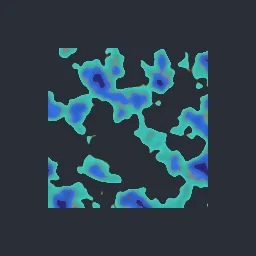
What this component contains
ATTRIBUTION.mdLICENSEREADME.mdcomponent.jsondemo.tscninspect_shader.pymaterial.trespreview.pngsprite_color_key_swap.gdshadertest_package.pyverification/native.json
How it works
- Shader type
- canvas_item
- Parameters
- key_1 (vec4 = 0.95, 0.6, 0.25, 1), target_1 (vec4 = 0.25, 0.8, 0.75, 1), key_2 (vec4 = 0.85, 0.35, 0.3, 1), target_2 (vec4 = 0.2, 0.45, 0.9, 1), key_3 (vec4 = 0.55, 0.2, 0.35, 1), target_3 (vec4 = 0.15, 0.15, 0.45, 1), tolerance (float = 0.16), softness (float = 0.1) and 1 more
- Use it on
- A Sprite2D (or other textured CanvasItem) with transparent space around its shape, assigned to the node as usual.
- Result
- The orange, red and purple sprite recoloured to teal, blue and navy.
- Renderers
- compatibility: compiled and rendered, forward plus: not verified, mobile: not verified
- Placement
- res://baltor/godot_shaders/sprite_color_key_swap/
Recorded checks
godot 4.7.2.stable.official.ed1daf0bf
contract_staticengine_runengine_log_cleanshader_in_scenecapture_writtenrender_not_uniformshader_changes_pixels
Limits to consider
Matching is by RGB distance, so similar colours elsewhere in the sprite can be caught; author sprites with distinct key colours. Three pairs per material.