 Agent
Agent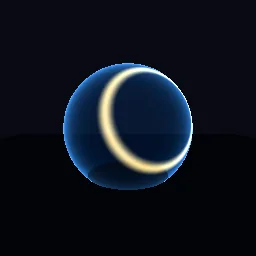
What this component contains
ATTRIBUTION.mdLICENSEREADME.mdcomponent.jsondemo.tscninspect_shader.pymaterial.trespreview.pngshield_hit_ripple.gdshadertest_package.pyverification/native.json
How it works
- Shader type
- spatial
- Render modes
- unshaded, blend_add, cull_disabled, depth_draw_never, shadows_disabled
- Parameters
- shield_color (vec4 = 0.25, 0.6, 1, 1), impact_color (vec4 = 1, 0.85, 0.5, 1), hit_azimuth_degrees (float = 25), hit_elevation_degrees (float = 15), impact_progress (float = 0.35), loop_impacts (bool = yes), loop_period (float = 1.5), ring_width (float = 0.12) and 3 more
- Use it on
- A sphere centred on its origin. To aim at a world hit point, convert it to the object's local direction in a script and set the two angles.
- Result
- A faint blue bubble with a bright ring spreading out from the impact point.
- Renderers
- compatibility: compiled and rendered, forward plus: not verified, mobile: not verified
- Placement
- res://baltor/godot_shaders/shield_hit_ripple/
Recorded checks
godot 4.7.2.stable.official.ed1daf0bf
contract_staticengine_runengine_log_cleanshader_in_scenecapture_writtenrender_not_uniformshader_changes_pixels
Limits to consider
One impact at a time; several simultaneous hits need several materials or an array uniform. Directions are taken from vertex positions, so the mesh must be roughly spherical around its origin. Additive, so it cannot darken.